Tuesday, 29 January 2019

Closing a board in trello

Close a board by selecting "Close Board" from the board menu (open the  board's menu and click the "More" button to expand the menu options). You have to be an admin of a board to close it. In Business Class teams, the team admin can also close the board.


Other board members will receive a notification that the board has been closed.


to reactivate: Once a board is closed, it is no longer visible in your Boards list and can only be accessed by clicking the Boards button at the top left of your Trello page and selecting "See closed boards..."  


source: https://help.trello.com/article/777-closing-a-board

Sunday, 27 January 2019

Increase number of recent files in task bar

Click your Start Button, type regedit and hit Enter to open the Registry Editor 

Navigate to: 
HKEY_CURRENT_USER\Software\Microsoft\ Windows\CurrentVersion\Explorer\Advanced 

On the right-side, look for an entry named JumpListItems_Maximum. 

If there is no such entry, you need to create one by right-clicking on the empty area, clicking New, clicking DWORD (32-bit) Value, and name it as JumpListItems_Maximum 

Double click that DWORD and set its value to 20 or 30 

Close the Registry Editor and restart your system


source: https://answers.microsoft.com/en-us/windows/forum/all/how-to-increase-the-number-of-recent-files/2ec5e80a-c8f1-4e25-bd5e-4c98169a520e

Sunday, 20 January 2019

Getting grayscale image from optitrack camera


Yes, all OptiTrack cameras have the capability of transmitting the entire grayscale frame to the host PC. Motive or the Camera SDK provides the ability to select the video mode and access the data. Furthermore, MJPEG grayscale video is also supported for transmitting downsampled images in order to reduce network traffic.
source: https://optitrack.com/support/faq/general.html

note: helps with identifying false positives for the IR markers.

Thursday, 17 January 2019

Fixing mouse click

Adjusting Mouse Click Sensitivity

  1. Display the Control Panel.
  2. Click the Hardware and Sound category.
  3. Click the Mouse link, under the Devices and Printers category. Windows displays the Mouse Properties dialog box.
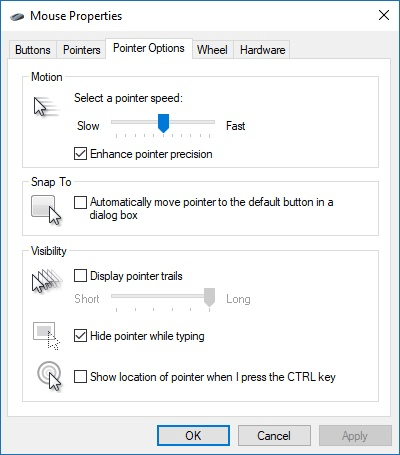
  4. Make sure the Pointer Options tab is displayed. (See Figure 1.)
  5. Figure 1. The Pointer Options tab of the Mouse Properties dialog box.
You may need to play around with the settings in the dialog box a bit; the major thing to check is your pointer speed. There have been reports that if the speed is set too slow or too fast for your mouse, it can result in some erratic behavior—like that reported by Donna.

source: https://windows.tips.net/T013387_Adjusting_Mouse_Click_Sensitivity.html


  1. Open the Control Panel.
  2. Click Hardware and Sound
  3. Click Mouse
  4. In the Mouse Properties click the Activities tab and drag the slider left to slow down the mouse double-click speed or right to speed up the mouse double-click speed.
Mouse double-click speed

source: https://www.computerhope.com/issues/ch000816.htm

Tuesday, 15 January 2019

google groups - making emails accessible to managers in addition to owners


It appears that there were restrictions set (perhaps accidentally) so that only the owner of the group can view e-mail addresses.

As a manager of the group, could you try fixing this by:
  • After entering "Manage" in the main group page, scroll down to "Permissions".
  • Expand the "Permissions" tree, and then select "Access permissions". 
  • Within this webpage, should be a section named "View Member Email Addresses"
  • Activate the "Select groups of users" button, and select "Managers of the group"
  • Activate the "Save" button to save your changes

source: https://groups.google.com/forum/#!topic/accessible/B38WfM8Cy8c

Monday, 14 January 2019

error with package installation due to Environment error

Problem:

Could not install packages due to an Environment error :[error 13]: permission denied 

Solution:
pip install --user package-name

source: https://stackoverflow.com/questions/50807507/could-not-install-packages-due-to-an-environment-error-error-13-permission-d

Clearing out Synaptic lock files

Problem:
E: Could not get lock /var/lib/dpkg/lock - open (11 Resource temporarily unavailable)
E: Unable to lock the administration directory (/var/lib/dpkg/) is another process using it?  

You can delete the lock file with the following command:
sudo rm /var/lib/apt/lists/lock
You may also need to delete the lock file in the cache directory
sudo rm /var/cache/apt/archives/lock
sudo rm /var/lib/dpkg/lock
After that, try opening Synaptic again.

source: https://askubuntu.com/questions/15433/unable-to-lock-the-administration-directory-var-lib-dpkg-is-another-process

Tuesday, 11 December 2018

difference between SAXS and WAXS

Small-angle x-ray scattering (SAXS) is elastic scattering of monochromatic x-rays on small scattering angles (up to a few degrees) and wide-angle x-ray scattering (WAXS) is the same on larger scattering angles. X-ray diffraction is a type of WAXS (or sometimes also SAXS), where the scattering arises from crystals and produces Bragg peaks (diffraction peaks) as a function of the scattering angle (or spots or rings in 2D patterns). In single crystal diffraction the diffraction is only from one large crystal and the diffraction pattern is recorded in 2D.

The basic difference between SAXS and WAXS is the lengthscale they correspond to: WAXS detects ordering of individual atoms and SAXS probes larger structures based on electron density differences (e.g. proteins in solution or pores in a solid matrix). When using transmission geometry and a 2D detector, switching between SAXS and WAXS can be easily done by moving the detector closer to the sample.


source: https://www.researchgate.net/post/What_is_the_difference_between_SAXS_and_WAXS

distinguishing PTFE and 'Teflon'

Teflon is the best-known brand of PTFE.

PTFE film is a non-stick coating. PTFE tape is useful for sealing threads for pneumatic interlocks.


source: https://en.wikipedia.org/wiki/Polytetrafluoroethylene

SR44 vs LR44 coin cell batteries

Typically found in Calipers.


Digital calipers use a silver oxide button cell, typically the SR44 size, aka 357, 11.6mm diameter by 5.4mm high. A genuine SR44 or 357 cell is hard to find, and the alkaline LR44, which is the same size button, and same nominal voltage, is very common and easy to find. This alkaline LR44 cell is put into toys, laser pointers, etc., and has gotten very cheap because of the large quantities made in China. However, alkaline buttons have much less mAh capacity, and have a critical weakness when used in devices like digital calipers that quit working when battery voltage falls. Alkaline cells quickly "droop" their voltage (they have a non-flat discharge curve), compared to silver oxide, and thus don't run calipers for very long before the display fades or blinks from low voltage.


TLDR: SR44 lasts longer but rarer + more expensive. Difference due to constituent materials. Otherwise geometry and purpose is the same.


source: http://www.truetex.com/buttons.htm

tin-cure vs platinum-cure silicone mold making rubbers

The chemical difference between tin-cure (condensation cure) and platinum-cure (addition cure) silicone mold making rubbers lies mainly in the metal used to catalyze or cure the base rubber. The metal tin is used to catalyze or cure tin silicone, and platinum is used to cure platinum silicone rubber. Accordingly, tin-cure silicone rubbers are usually significantly less expensive than platinum-cure ones.


Considerations:
. Inhibition (due to impurities or contaminants)
. Shrinkage
. Library life
. Production life


source: https://www.smooth-on.com/support/faq/184/

Tuesday, 27 November 2018

quick method to add error bars and standard deviations to excel graphs

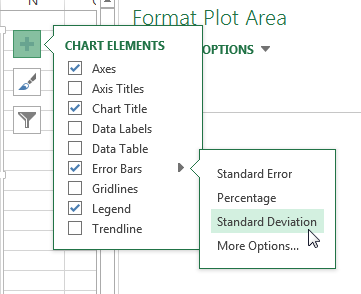
new excel (since 2013?) has an easily accessible button at the top-right of a chart that allows you to quickly add std error/deviation.


standard deviation excel graphs2


source: https://www.pryor.com/blog/add-error-bars-and-standard-deviations-to-excel-graphs/

shaded error bars in excel

summary: specify the upper/lower bounds using the error of your choice, plot those along with the primary data, then use transparency for the top bound to get the color effect and white-fill to remove what's below the bottom bound.

one comment to add to the below source is that depending on the order your data is loaded into the plot, you may need to switch up the order of the data series to obtain the correct appearance. however, top > data > bottom always in the order.


example:
before_and_after_error_bands.png


source: https://nikkimarinsek.com/blog/tutorial-how-to-make-shaded-error-bands-in-excel

radar/spider charts in excel


In Excel 2013, click Insert > Insert Stock, Surface or Radar Chart > Radar.


example:
doc-radar-chart-4


source: https://www.extendoffice.com/documents/excel/2135-excel-create-radar-chart.html

transparency of features within a part - reversing back to non-transparent


shift + left click to select
shift + right click to bring up option menu.

(might differ depending on keyboard mappings since the thread says tab+click)


source: https://forum.solidworks.com/thread/52713

Checking amazon spending history totals


Download entire order history (or specified dates) as excel file and calculate.

https://www.amazon.com/gp/b2b/reports

source: https://clark.com/shopping-retail/online-shopping/amazon-spending-history-total/

Friday, 2 November 2018

MD5 file extension

Files that contain the .md5 file extension are checksum files that are used to ensure that the data within a file is complete and has not become corrupt. An MD5 file verifies the integrity of downloaded files, discs and disk images.
source: https://file.org/extension/md5

Saturday, 8 September 2018

Mac - OS version from command line

system_profiler SPSoftwareDataType

OR

sw_vers

There are others but I found these two to be the most informative.

source: https://coderwall.com/p/4yz8dq/determine-os-x-version-from-the-command-line

ASUS laptop - keyboard backlight

use physical keyboard shortcuts rather than digital keyboard settings.


source: https://rog.asus.com/forum/showthread.php?1106-Can-t-seem-to-turn-on-keyboard-backlight-on-G53

Friday, 17 August 2018

Recover old events in google calendar (within 30 days)

as of 2018:
--> gear icon --> trash --> [select calendar]

source: https://productforums.google.com/forum/#!topic/calendar/MtNndu_xd2E

Hide completed tasks in Asana/Instagantt

--> show incomplete

source: https://community.asana.com/t/completed-tasks-just-fading-instead-of-disappearing/3420

Tuesday, 14 August 2018

Python pip package RequestsDependencyWarning - cryptography

Error:
 /usr/local/lib/python2.7/dist-packages/requests/__init__.py:83: RequestsDependencyWarning: Old version of cryptography ([1, 2, 3]) may cause slowdown.
Solution:
sudo pip install --upgrade cryptography
sudo python -m easy_install --upgrade pyOpenSSL


source: https://stackoverflow.com/questions/51283708/python-pip-package-requestsdependencywarning-when-installing-elastic-search-cura

Monday, 13 August 2018

Recover unsaved files in Sublime Text

Open %APPDATA%\Sublime Text 3\Local in a folder and open the Session.sublime_session file in a text editor. If you're lucky, extract the save data without additional hassle (may need to reformat).


source: https://forum.sublimetext.com/t/how-to-recover-lost-unsaved-files/18673

Sunday, 8 July 2018

Driver Installation Issue with BeagleBone Black (generalizable to any failures of installation of unsigned drivers)

Installation of Windows 10 Bone_D64.exe was failing.

Reason turned out to be:
Microsoft OS no longer allows direct installation of unsigned drivers to reduce access by malware. (there might be more to this...)


Solution:
> Updating the BIOS did not work for me, but installing RNDIS drive worked
> with the following instructions (found somewhere else that I cannot find
> now)
>
> device manager
> Under other devices choose RNDIS
> right click on it and update driver
> Browse my computer
> let me pick
> "Network adapters"
> select microsoft from on the left
> choose "USB RNDIS"
> Click next
> click yes
> then close
> DONE!!! YEAH !!!

source: https://groups.google.com/forum/#!category-topic/beagleboard/usb/-gczCwKR2Rk

Monday, 2 July 2018

Fixing when a file exceeds github's file size limit of 100 mb

git filter-branch --index-filter 'git rm --cached --ignore-unmatch [file]' merge-point..HEAD


source: http://www.thisprogrammingthing.com/2013/fixing-the-this-exceeds-githubs-file-size-limit-of-100-mb-error/