How do I find out which graphics card and driver my Windows pc has?
If you are not sure which card is in the computer, the exact name of your graphics card is available in the Windows Display Settings, that you can find through the Control Panel. You can also run Microsoft's DirectX diagnostic tool to get this information:
From the Start menu, open the Run dialog box.
Type dxdiag
Click on the Display tab of the dialog that opens to find graphics card information.
source: https://www.cisco.com/c/en/us/td/docs/telepresence/endpoint/articles/cisco_telepresence_movi_find_out_graphics_card_driver_on_windows_pc_kb_540.html
Wednesday, 2 October 2019

Sunday, 15 September 2019
Change Directory in PowerShell to nonstandard locations (not using cd)
Set-Location "Q:\My Test Folder"
source: https://stackoverflow.com/questions/41130310/change-directory-in-powershell
source: https://stackoverflow.com/questions/41130310/change-directory-in-powershell
Monday, 10 June 2019
How to change my mouse wheel scroll rate?
The fix for me for this (I had it for months) was pretty surreal and like most folks I didn't believe it until I did it:
Some MS mice have a scrollwheel bug.
Try unplugging the USB cable / dongle then plug back in.
Also, I noticed that if you have the dongle plugged in to the computer and the mouse has an on-off mechanism then you can just turn the mouse off and back on. That resets the data link between the mouse and dongle.
source: https://askubuntu.com/questions/22589/how-to-change-my-mouse-wheel-scroll-rate
Monday, 11 March 2019
tutorial for creating a bootable USB Stick on Windows for Ubuntu
Rufus (software for configuring your USB device) seems to be more reliable than some of the other options available on the internet.
source: https://tutorials.ubuntu.com/tutorial/tutorial-create-a-usb-stick-on-windows#0
source: https://tutorials.ubuntu.com/tutorial/tutorial-create-a-usb-stick-on-windows#0
wifi drops on its own in ubuntu
Seems like it has to do with a default 'power management' option.
source: https://www.quora.com/Why-does-my-WiFi-get-disconnected-on-its-own-in-Ubuntu
- sudo ifconfig wlp4s0 down
- sudo iwconfig wlp4s0 power off
- sudo ifconfig wlp4s0 up
- sudo service network-manager restart
source: https://www.quora.com/Why-does-my-WiFi-get-disconnected-on-its-own-in-Ubuntu
Friday, 8 March 2019
'gazebo' in terminal doesn't run properly
gazebo: symbol lookup error: /usr/lib/x86_64-linux-gnu/
ignition-math version is out of date.
source: https://bitbucket.org/osrf/gazebo/issues/2448/problem-running-gazebo7
ignition-math version is out of date.
sudo apt upgrade libignition-math2source: https://bitbucket.org/osrf/gazebo/issues/2448/problem-running-gazebo7
Tuesday, 5 March 2019
Mouse click wasn't working properly
If the mouse is working in Safe Mode, there is likely a driver or software conflict. To fix this problem, follow the steps below. Expand the mouse (mice) option in Device Manager by clicking the + symbol. Remove all mice listed by highlighting each device and then pressing the delete key on the keyboard.
> reinstalling driver worked.
source: https://www.computerhope.com/issues/ch000254.htm
Thursday, 28 February 2019
github desktop ui stuck in loop when .git path is updated to something invalid
File/Edit/etc toolbar still appear to function. Can delete the existing repository to exit the loop. Then re-clone the appropriate origin.
source: self
source: self
git - "Commit failed - exit code 1 received"
most occurrences should be due to having nested .git directories
source: https://github.com/desktop/desktop/issues/4432
Saturday, 16 February 2019
See changes to a specific file using git
git diffsource: https://stackoverflow.com/questions/8048584/see-changes-to-a-specific-file-using-git
change font for powershell
In Windows 8.1, go to the Start Screen, type powershell. On the Windows PowerShell result, right on it and select Run as administrator. Once the window opens on your desktop, right-click on the blue icon in the top left corner and select Properties.

source: https://www.thewindowsclub.com/powershell-font-window-too-small
forcibly reset everything to your last commit
git reset --hard HEAD
source: https://stackoverflow.com/questions/2125710/how-to-revert-a-git-rm-r
Thursday, 7 February 2019
Convert from .obj to .stl
Get Blender.
- Start it
- Hit delete to get rid of the cube
- File, Import, OBJ, your object
- File, export, STL, your filename
Bonus points for repairing it with the 3D printing toolbox: https://tamarintech.com/article/blender_3d_toolbox
source: https://www.reddit.com/r/3Dprinting/comments/3pwxa7/need_help_converting_a_obj_to_stl/cwa59oq/
Wednesday, 6 February 2019
Locating a lost android device
TLDR: go to https://www.google.com/android/find
Your locations if you have location enabled: https://www.google.com/maps/timeline
note: requires device to still have charge.
Additional info:
Google Maps timeline: https://support.google.com/maps/answer/6258979
Manage your location history: https://support.google.com/accounts/answer/3118687
sources for lost android:
. https://support.google.com/accounts/answer/3265955
. https://support.google.com/accounts/answer/6160491
Your locations if you have location enabled: https://www.google.com/maps/timeline
note: requires device to still have charge.
Additional info:
Google Maps timeline: https://support.google.com/maps/answer/6258979
Manage your location history: https://support.google.com/accounts/answer/3118687
sources for lost android:
. https://support.google.com/accounts/answer/3265955
. https://support.google.com/accounts/answer/6160491
Tuesday, 29 January 2019
Closing a board in trello
Close a board by selecting "Close Board" from the board menu (open the board's menu and click the "More" button to expand the menu options). You have to be an admin of a board to close it. In Business Class teams, the team admin can also close the board.
Other board members will receive a notification that the board has been closed.
to reactivate: Once a board is closed, it is no longer visible in your Boards list and can only be accessed by clicking the Boards button at the top left of your Trello page and selecting "See closed boards..."
source: https://help.trello.com/article/777-closing-a-board
Sunday, 27 January 2019
Increase number of recent files in task bar
Click your Start Button, type regedit and hit Enter to open the Registry Editor
Navigate to:
HKEY_CURRENT_USER\Software\Microsoft\ Windows\CurrentVersion\Explorer\Advanced
On the right-side, look for an entry named JumpListItems_Maximum.
If there is no such entry, you need to create one by right-clicking on the empty area, clicking New, clicking DWORD (32-bit) Value, and name it as JumpListItems_Maximum
Double click that DWORD and set its value to 20 or 30
Close the Registry Editor and restart your system
source: https://answers.microsoft.com/en-us/windows/forum/all/how-to-increase-the-number-of-recent-files/2ec5e80a-c8f1-4e25-bd5e-4c98169a520e
Navigate to:
HKEY_CURRENT_USER\Software\Microsoft\ Windows\CurrentVersion\Explorer\Advanced
On the right-side, look for an entry named JumpListItems_Maximum.
If there is no such entry, you need to create one by right-clicking on the empty area, clicking New, clicking DWORD (32-bit) Value, and name it as JumpListItems_Maximum
Double click that DWORD and set its value to 20 or 30
Close the Registry Editor and restart your system
source: https://answers.microsoft.com/en-us/windows/forum/all/how-to-increase-the-number-of-recent-files/2ec5e80a-c8f1-4e25-bd5e-4c98169a520e
Sunday, 20 January 2019
Getting grayscale image from optitrack camera
Yes, all OptiTrack cameras have the capability of transmitting the entire grayscale frame to the host PC. Motive or the Camera SDK provides the ability to select the video mode and access the data. Furthermore, MJPEG grayscale video is also supported for transmitting downsampled images in order to reduce network traffic.
Thursday, 17 January 2019
Fixing mouse click
Adjusting Mouse Click Sensitivity

- Display the Control Panel.
- Click the Hardware and Sound category.
- Click the Mouse link, under the Devices and Printers category. Windows displays the Mouse Properties dialog box.
- Make sure the Pointer Options tab is displayed. (See Figure 1.)
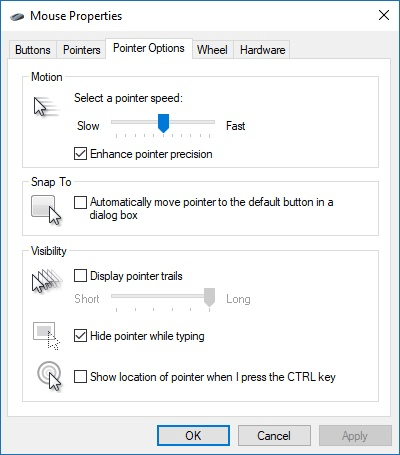
Figure 1. The Pointer Options tab of the Mouse Properties dialog box.
You may need to play around with the settings in the dialog box a bit; the major thing to check is your pointer speed. There have been reports that if the speed is set too slow or too fast for your mouse, it can result in some erratic behavior—like that reported by Donna.
source: https://windows.tips.net/T013387_Adjusting_Mouse_Click_Sensitivity.html
- Open the Control Panel.
- Click Hardware and Sound
- Click Mouse
- In the Mouse Properties click the Activities tab and drag the slider left to slow down the mouse double-click speed or right to speed up the mouse double-click speed.
source: https://www.computerhope.com/issues/ch000816.htm
Tuesday, 15 January 2019
google groups - making emails accessible to managers in addition to owners
It appears that there were restrictions set (perhaps accidentally) so that only the owner of the group can view e-mail addresses.
As a manager of the group, could you try fixing this by:
- After entering "Manage" in the main group page, scroll down to "Permissions".
- Expand the "Permissions" tree, and then select "Access permissions".
- Within this webpage, should be a section named "View Member Email Addresses"
- Activate the "Select groups of users" button, and select "Managers of the group"
- Activate the "Save" button to save your changes
source: https://groups.google.com/forum/#!topic/accessible/B38WfM8Cy8c
Monday, 14 January 2019
error with package installation due to Environment error
Problem:
Could not install packages due to an Environment error :[error 13]: permission denied
Solution:
pip install --user package-name
source: https://stackoverflow.com/questions/50807507/could-not-install-packages-due-to-an-environment-error-error-13-permission-d
Clearing out Synaptic lock files
Problem:
E: Could not get lock /var/lib/dpkg/lock - open (11 Resource temporarily unavailable)
E: Unable to lock the administration directory (/var/lib/dpkg/) is another process using it?
You can delete the lock file with the following command:
sudo rm /var/lib/apt/lists/lock


You may also need to delete the lock file in the cache directory
sudo rm /var/cache/apt/archives/lock
sudo rm /var/lib/dpkg/lock


After that, try opening Synaptic again.


source: https://askubuntu.com/questions/15433/unable-to-lock-the-administration-directory-var-lib-dpkg-is-another-process
Tuesday, 11 December 2018
difference between SAXS and WAXS
Small-angle x-ray scattering (SAXS) is elastic scattering of monochromatic x-rays on small scattering angles (up to a few degrees) and wide-angle x-ray scattering (WAXS) is the same on larger scattering angles. X-ray diffraction is a type of WAXS (or sometimes also SAXS), where the scattering arises from crystals and produces Bragg peaks (diffraction peaks) as a function of the scattering angle (or spots or rings in 2D patterns). In single crystal diffraction the diffraction is only from one large crystal and the diffraction pattern is recorded in 2D.
The basic difference between SAXS and WAXS is the lengthscale they correspond to: WAXS detects ordering of individual atoms and SAXS probes larger structures based on electron density differences (e.g. proteins in solution or pores in a solid matrix). When using transmission geometry and a 2D detector, switching between SAXS and WAXS can be easily done by moving the detector closer to the sample.
The basic difference between SAXS and WAXS is the lengthscale they correspond to: WAXS detects ordering of individual atoms and SAXS probes larger structures based on electron density differences (e.g. proteins in solution or pores in a solid matrix). When using transmission geometry and a 2D detector, switching between SAXS and WAXS can be easily done by moving the detector closer to the sample.
source: https://www.researchgate.net/post/What_is_the_difference_between_SAXS_and_WAXS
distinguishing PTFE and 'Teflon'
Teflon is the best-known brand of PTFE.
PTFE film is a non-stick coating. PTFE tape is useful for sealing threads for pneumatic interlocks.
source: https://en.wikipedia.org/wiki/Polytetrafluoroethylene
PTFE film is a non-stick coating. PTFE tape is useful for sealing threads for pneumatic interlocks.
source: https://en.wikipedia.org/wiki/Polytetrafluoroethylene
SR44 vs LR44 coin cell batteries
Typically found in Calipers.
Digital calipers use a silver oxide button cell, typically the SR44 size, aka 357, 11.6mm diameter by 5.4mm high. A genuine SR44 or 357 cell is hard to find, and the alkaline LR44, which is the same size button, and same nominal voltage, is very common and easy to find. This alkaline LR44 cell is put into toys, laser pointers, etc., and has gotten very cheap because of the large quantities made in China. However, alkaline buttons have much less mAh capacity, and have a critical weakness when used in devices like digital calipers that quit working when battery voltage falls. Alkaline cells quickly "droop" their voltage (they have a non-flat discharge curve), compared to silver oxide, and thus don't run calipers for very long before the display fades or blinks from low voltage.
source: http://www.truetex.com/buttons.htm
Digital calipers use a silver oxide button cell, typically the SR44 size, aka 357, 11.6mm diameter by 5.4mm high. A genuine SR44 or 357 cell is hard to find, and the alkaline LR44, which is the same size button, and same nominal voltage, is very common and easy to find. This alkaline LR44 cell is put into toys, laser pointers, etc., and has gotten very cheap because of the large quantities made in China. However, alkaline buttons have much less mAh capacity, and have a critical weakness when used in devices like digital calipers that quit working when battery voltage falls. Alkaline cells quickly "droop" their voltage (they have a non-flat discharge curve), compared to silver oxide, and thus don't run calipers for very long before the display fades or blinks from low voltage.
TLDR: SR44 lasts longer but rarer + more expensive. Difference due to constituent materials. Otherwise geometry and purpose is the same.
source: http://www.truetex.com/buttons.htm
tin-cure vs platinum-cure silicone mold making rubbers
The chemical difference between tin-cure (condensation cure) and platinum-cure (addition cure) silicone mold making rubbers lies mainly in the metal used to catalyze or cure the base rubber. The metal tin is used to catalyze or cure tin silicone, and platinum is used to cure platinum silicone rubber. Accordingly, tin-cure silicone rubbers are usually significantly less expensive than platinum-cure ones.
Considerations:
. Inhibition (due to impurities or contaminants)
. Shrinkage
. Library life
. Production life
source: https://www.smooth-on.com/support/faq/184/
Considerations:
. Inhibition (due to impurities or contaminants)
. Shrinkage
. Library life
. Production life
source: https://www.smooth-on.com/support/faq/184/
Subscribe to:
Posts (Atom)